


Bowling by Jason Belmonte
4.54.57K Reviews
App Specs
- Version
- 1.907
- Updated On
- License
- Free
- Downloads
- 500,000+
- Developer
- WannaPlay Studio Ltd
- Categories
- Sports
- Platform
- Android
Screenshots




 Analysis by AppCompare
I see Bowling by Jason Belmonte as a casual sports game that works best when you want a quick, bowling-shaped break rather than a full substitute for a night at the lanes. Its appeal is easy to understand: bowling is familiar, each frame gives you a small problem to solve, and a phone makes it possible to pick up a game in spare moments. I like that focused premise, though I would approach its claims of depth with care. A game can evoke the rhythm of bowling without reproducing the feel, social atmosphere, or physical technique of the real sport.
A good fit for short, focused sessions
The most useful way to think about a mobile bowling game is as something you can play in small chunks. A few frames fit into a quiet break, while a longer session gives you room to settle into a score and work on consistency. That flexibility is the main reason I would recommend this kind of game to someone who enjoys bowling but cannot always get to a real alley. You can return to the familiar aim of clearing the pins without arranging a group, travelling, or making an evening of it.
It also suits people who enjoy trying to improve at a simple, repeatable task. Bowling is easy to understand at a glance, but a good result still depends on controlling the shot rather than merely tapping through. I find that combination welcoming: new players can start with the basic objective, while more patient players can treat each turn as a chance to make a more deliberate choice. The game’s strongest role is therefore not as a technical training tool, but as a compact way to enjoy the sport’s central challenge.
What a phone version can and cannot reproduce
Playing on a touchscreen changes the experience. A real ball has weight, lane friction, and a physical release; a mobile game turns those sensations into inputs and animation. That makes the game convenient, but it also means success depends partly on learning how its controls respond. I would give myself a few practice turns before judging a score or assuming that a shot was unpredictable. Familiarity with the interface matters as much as bowling intuition.
Compared with a bowling game built around exaggerated effects or arcade spectacle, a more grounded presentation can be appealing to players who want the pins and the shot to stay at the centre. Compared with a dedicated sports simulation, however, a mobile version is naturally more limited as a way to study real technique. If your goal is to learn how to release a real ball, improve your approach, or understand lane conditions, time at an actual alley and advice from a human coach will be more useful. I would treat this as entertainment inspired by bowling, not a replacement for practice.
How I would make the most of it
For a more satisfying session, I would focus on repeatability rather than chasing a perfect result straight away. Use a consistent starting point and make one adjustment at a time; changing several things after a missed shot makes it difficult to tell what helped. If the controls let you influence direction or spin, testing one variation across a few turns is more informative than changing the release every frame. This small, deliberate routine turns casual play into a personal challenge without requiring a complicated strategy.
A realistic use case is a short wait between errands. I would open the game for a few frames, pay attention to whether my aim is consistent, and then stop rather than letting a quick break turn into a long session. That makes the game a handy option for someone who wants a simple activity that does not require a full group or a long setup. It is less suitable when I want conversation, movement, or the shared excitement of watching friends bowl in person; the phone version cannot supply that atmosphere.
Worth Reading Before You Choose

EA SPORTS FC Mobile 26 Is a Bigger Football Game, but It Takes Time

Flipboard Shows What News Apps Must Do Beyond the Feed

Switching to Android Auto Means Rethinking Your Driving Routine

Google Calendar Makes a Crowded Week Easier to Manage

Ludo King Makes the Most of the Minutes Between Plans

Baby Panda World Brings Quick Play to Modern Phones, but Its Game Library Feels Busy
Another useful distinction is whether you want solo play or a social contest. A solitary session gives you room to concentrate on your own score and learn the timing at your own pace. If you are choosing a bowling game mainly to spend time with friends, check that the way you plan to play actually suits your group before settling in: playing alongside someone in the same room feels different from competing at separate times or through online features. I would not assume that every kind of social play has the same convenience or immediacy.
First Impressions and User Interface
Right off the bat, the app welcomes you with a slick and modern interface. It’s like stepping into a virtual bowling alley that’s all polished and ready for action. The navigation is intuitive, making it easy to find your way around. Whether you're a newbie or a seasoned pro, the app's layout is straightforward, so you won't find yourself lost in the menus.
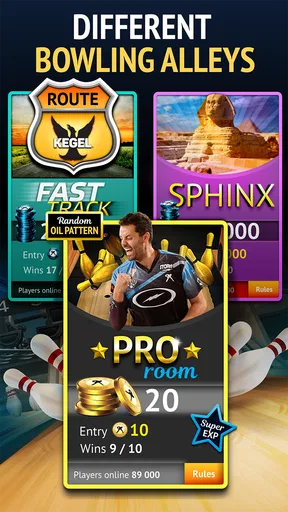
One of the first things that caught my eye was the attention to detail in the graphics. The lanes look realistic, and the animations are smooth, adding a nice touch to the overall experience. It’s like getting a front-row seat to watch Jason Belmonte himself, only you’re the one holding the ball.
Gameplay and Features
Now, onto the gameplay – which is where Bowling by Jason Belmonte truly shines. The mechanics are designed to mimic real-life bowling, and let me tell you, it’s a blast. You get to choose your bowling ball, adjust your stance, and even control the spin, just like you would in a real game.
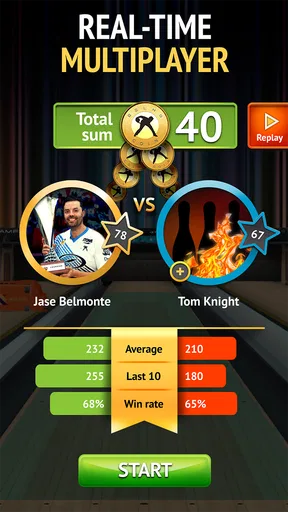
What I really enjoyed was the variety of game modes. Whether you’re looking to practice your skills in single-player mode or compete against friends in multiplayer, there’s something for everyone. The app even offers challenges and tournaments that keep things interesting and competitive.
Another cool feature is the ability to learn from the master himself. The app includes tips and tutorials from Jason Belmonte, which is like having a personal coach in your pocket. His insights are practical, and they can really help you up your game. So, if you’re serious about bowling, this is a feature you’ll definitely appreciate.
Customization and Personalization
Customization is a big part of what makes the app engaging. You can personalize your avatar, choose from a range of bowling balls, and even unlock special items as you progress. This adds a nice layer of personalization, making the game feel uniquely yours.
The app also allows you to track your progress and stats, which is a neat feature for those who love data. It’s satisfying to see your improvement over time, and it adds a motivational aspect to keep playing and honing your skills.
Social Interaction and Community
One of the aspects I found particularly appealing is the app’s social features. You can connect with friends, challenge them to matches, and even join leagues. This sense of community is one of the highlights, as it brings a social element to the game that’s both fun and competitive.
There’s also a leaderboard where you can see how you stack up against other players globally. It’s a great way to test your skills and see if you have what it takes to be at the top of the game.
Choosing it with realistic expectations
For anyone deciding whether to install it, the practical questions are how accessible it is, what it costs, and whether it is appropriate for the intended player. This is a free sports game from WannaPlay Studio Ltd, with optional in-app purchases priced from $0.99 to $99.99 per item. I would treat those purchases as optional rather than a reason to start spending: first see whether the core bowling experience holds your interest, and make any purchase only if you understand what it adds. The wide price range makes a little caution sensible, especially if a child will be playing.
The game is rated for Everyone, which makes it broadly suitable from an age-rating perspective, but that does not mean every player will enjoy it equally. Someone who likes score-chasing, familiar sports themes, and short repeatable challenges is a natural fit. A player looking for a deep career mode, a detailed lesson plan for real-world bowling, or a lively local multiplayer party may be happier with a different game or with the sport itself. The best choice depends on whether convenience or physical, shared play matters more.
It has been available since August 23, 2017, and its current version is 1.902, with Android 5.1 as the minimum operating system. Its longevity and broad audience suggest it has found a substantial group of players: it has over 500,000 installs and a 4.5 average from around 18,000 ratings, alongside roughly 4,500 written reviews. Those figures are useful context, not a promise that it will fit every phone or match every player’s expectations. Before installing, I would check that the device meets the minimum system requirement and leave room for the game to run comfortably.
Final Thoughts
All in all, Bowling by Jason Belmonte is more than just a game; it’s an immersive bowling experience that captures the essence of the sport. With its realistic gameplay, wealth of features, and engaging community, it’s a must-try for any bowling fan.
Whether you’re looking to improve your skills or simply have some fun with friends, this app delivers on all fronts. So, grab your virtual bowling ball and hit the lanes – you won’t be disappointed!
My verdict for the right kind of player
My recommendation is clearest for someone who wants an approachable bowling game to dip into, enjoys improving a score through repetition, and is comfortable with the difference between touchscreen play and the real sport. I would also suggest it to bowling fans curious about a mobile take on the game, provided they see its virtual lanes as a fun companion rather than a substitute for a real bowling night.
I would skip it if your priority is a realistic coaching tool, a guaranteed shared experience with friends in the same room, or a game that avoids optional purchases altogether. For everyone else, the sensible approach is to start free, learn how the controls feel, and decide from your own sessions whether its challenges and social options keep you coming back. That balance of easy access and familiar bowling appeal is what gives it a worthwhile place among mobile sports games, even if it cannot recreate the full feel of standing on a lane.
Pros
- Intuitive controls for easy gameplay
- Engaging multiplayer mode
- Realistic graphics and physics
- Customizable bowling balls
- Frequent updates with new features
Cons
- Occasional in-app ads
- Limited free content
- Requires constant internet connection
- Some levels can be repetitive
- In-app purchases can get pricey
FAQs for Bowling by Jason Belmonte
What features does Bowling by Jason Belmonte offer?
Bowling by Jason Belmonte includes a variety of features, such as realistic physics, a wide selection of bowling balls, and customizable avatars. Players can also enjoy different game modes, including single-player challenges and multiplayer tournaments. The game provides an immersive experience with high-quality graphics and sound effects, enhancing the overall gameplay.
Is Bowling by Jason Belmonte free to play?
Bowling by Jason Belmonte is free to download and play, but it offers in-app purchases. These purchases include premium bowling balls, avatar customizations, and other enhancements that can improve gameplay. While the game can be enjoyed without spending money, some features and items may require payment for access or quicker progression.
Can I play Bowling by Jason Belmonte offline?
Bowling by Jason Belmonte requires an internet connection for full functionality, especially for multiplayer modes and tournaments. However, the game may offer some limited offline features, such as practice modes or single-player challenges, allowing you to enjoy the game even without an active internet connection.
What devices are compatible with Bowling by Jason Belmonte?
Bowling by Jason Belmonte is available for both Android and iOS devices. It typically requires a moderate amount of storage space and is compatible with most smartphones and tablets. It's important to check the app store for specific device requirements and ensure your device’s operating system is up to date for optimal performance.
How can I improve my skills in Bowling by Jason Belmonte?
Improving skills in Bowling by Jason Belmonte involves practice and understanding the game mechanics. Players can experiment with different bowling balls to find the best fit for their style. Participating in challenges and tournaments also helps refine skills. Additionally, learning from tips and tutorials within the game can provide valuable insights.


